Create Usage Plan
A Usage Plan is prepaid that sets a data quota (KB, MB, GB), an SMS volume or a Voice quota (in secs) for a specified renewal period. The quota can be prorated over the renewal period.
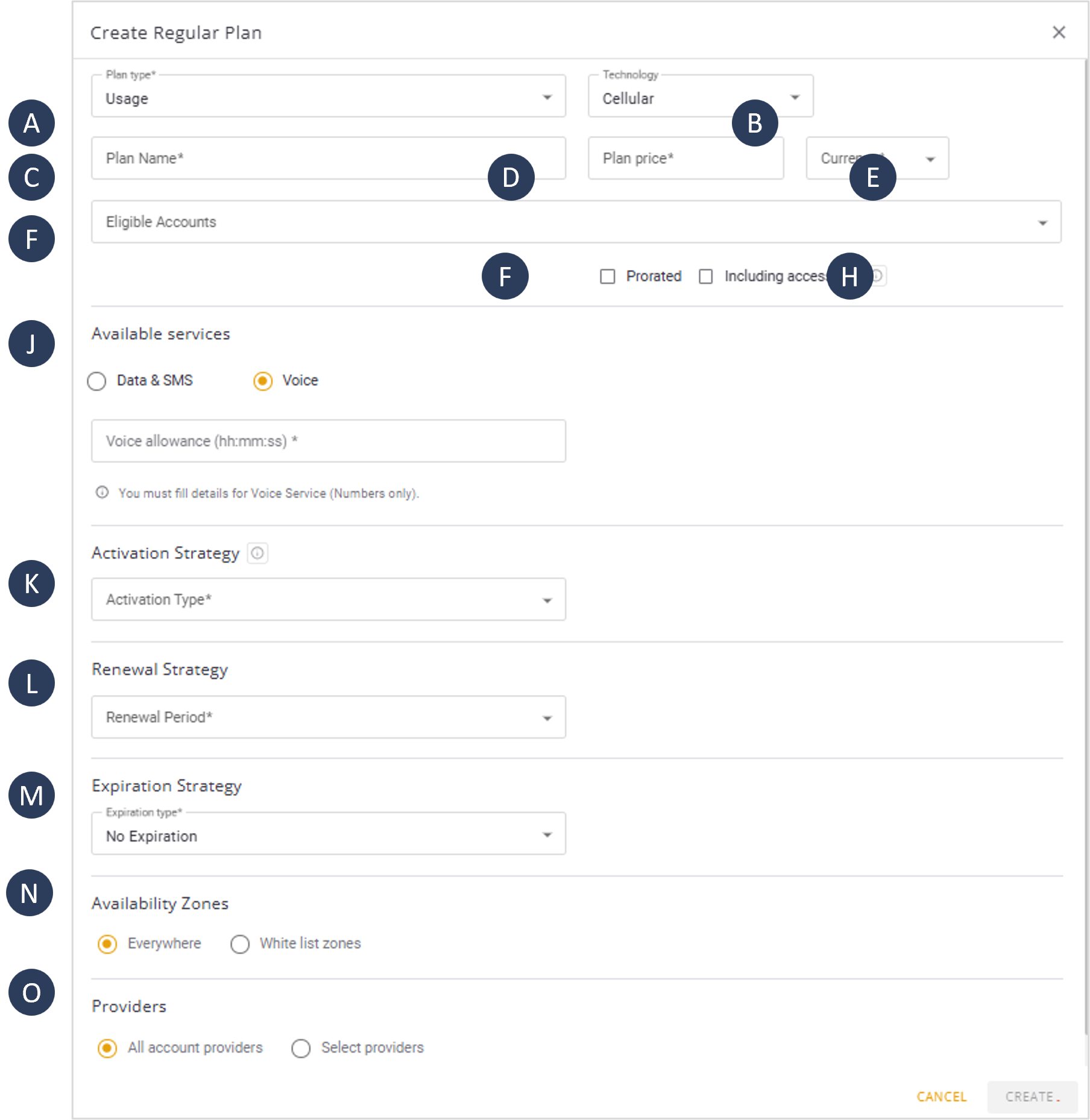
A screen capture of the Usage Plan options is shown here.
Plan Parameters
A description of the Usage Plan parameters is provided in this table.
| Parameter | Description | |
|---|---|---|
| A | Plan Type | The type of regular plan selected. |
| B | Technology | Select the type of connectivity service (cellular or satellite). |
| C | Plan Name | A unique identifier for the plan. |
| D | Plan Price | The cost of the plan, with option to specify the currency. |
| E | Currency | The currency used for the plan cost. |
| F | Eligible Accounts | The accounts that are eligible to use the plan. |
| G | Prorated | Calculation of cost based on actual usage. |
| H | Including Access Fee | Plan includes an Access Fee / Surchage |
| J | Available Services | Defines the services available in the plan, including Data/SMS or Voice Services |
| K | Activation Strategy | Specifies when the plan starts. The Activation Type can be set to regular, Renewal Cycle Activity, or First Activity. Refer to Activation Strategy. |
| L | Renewal Strategy | Defines the renewal period, which can be set to Daily, Weekly, Monthly, Quarterly, Semi-Annual, Annual, or One Time. Refer to Renewal Strategy. |
| M | Expiration Strategy | Specifies the plan expiration type, which can be set to No Expiration, Fixed Date, From Offer Activation, or From Plan First Use. Refer to Expiration Strategy. |
| N | Availability Zones | Determines where the plan is available, with options for Everywhere or White-List Zones. Refer to Availability Zones. |
| O | Providers | Specifies whether all account providers are available or if specific providers are selected for the plan. |
Step-by-Step Instructions
To create a Usage Plan, do these steps:
- Select Catalog |Plans from the Navigation sidebar.
- Select the Regular Plans tab.
- Click + Plan to display the Create regular Plan dialog box.
- Select Usage from the list of Plan Types*.
- Specify the type of Technology service:
- Cellular
- Satellite
- Type a name in the Plan Name* field.
- Specify a value in the Plan Price* field.
- Specify the Currency* from the list of options.
- Select one or more Eligible Accounts.
- Check the Prorated option if appropriate.
NOTE: The Prorated option is used to calculate a proportionate adjustment if a SIM is activated partway through the renewal period. The purpose is to ensure that charges align with the actual usage time.
- Check the Including Platform Fee if applicable.
- Check the type of Available Services:
- Data: Specify the allowance amount and unit (KB, MB, GB)
- SMS: Specify the allowance amount.
- Voice: Specify the amount of time (hh:mm:ss)
- Select an Activation Strategy.
- Select a Renewal Strategy.
- Select an Expiration Strategy.
- Check the appropriate Availability Zones.
- Check the appropriate Providers option:
- All account providers: This plan can be assigned to all authorized providers listed in the Providers Module.
- Select providers: This plan can be assigned to selected providers only.
- Click Create to display the plan in the plans table.
NOTE: Any step marked with an asterisk (*) is mandatory and must be completed by selecting an appropriate option.
IMPORTANT: You can now access the SIMs Module to attach SIMs to this plan. You should note that a SIM must be attached to a plan in order to utilize connectivity services such as Data and SMS.